
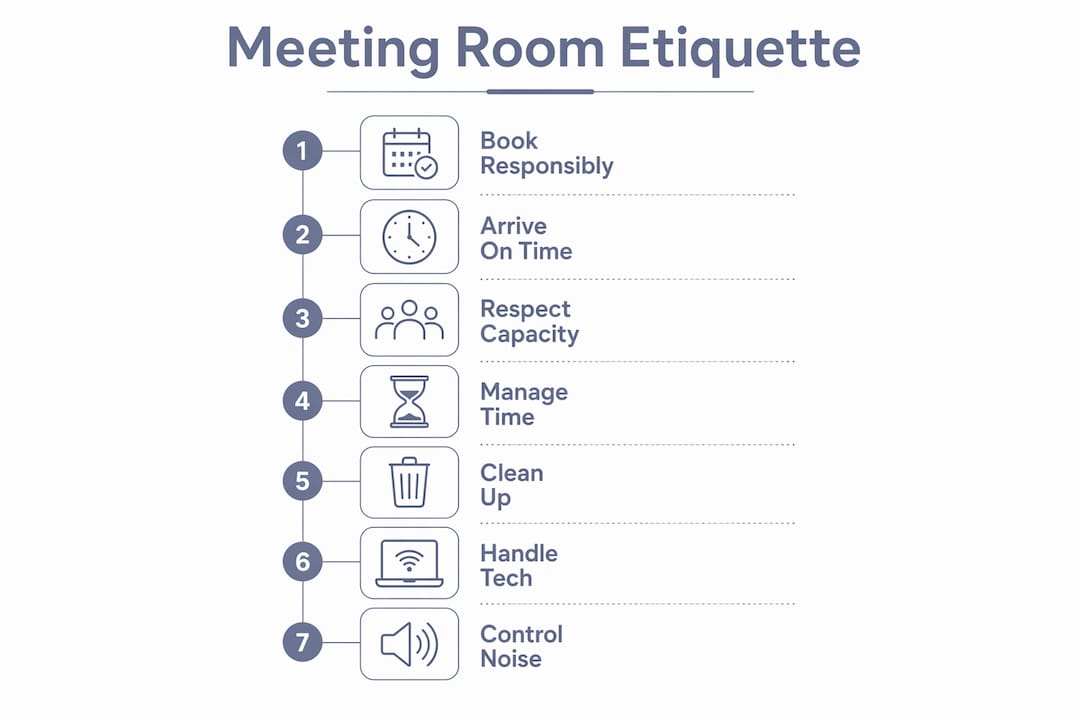
Good meeting room etiquette comes down to one rule: treat shared spaces like you borrowed them from someone who needs them next. Here’s the short version you can pin on the wall right now:
- Book through the official system, never verbally
- Cancel at least 30 minutes before if plans change
- Arrive a few minutes early; start on time regardless
- Keep food and drink tidy (and odor-friendly)
- Mute devices, close personal tabs, be present
- Leave the room exactly as you found it
- Report any tech issues before you walk out
Do those seven things consistently, and you’ll eliminate most of the friction that makes shared meeting rooms a daily headache.
Table of Contents
- Why meeting room etiquette actually matters at work
- How to book responsibly and cancel without drama
- Start on time, end on time, and handle overruns gracefully
- Room clean-up checklist: what to do before you leave
- Technology and digital etiquette for in-room and hybrid meetings
- Practical rules for food, drink, and refreshments
- Evidence-backed ground rules that actually improve meetings
- Solve common meeting room problems with quick scripts
- Your printable meeting room etiquette checklist
- Respect reservations and avoid double-booking
- Room capacity guidelines keep everyone comfortable
- How to use whiteboards, projectors, and presentation materials
- Noise control: keep it in the room
- Key Takeaways
- What meeting hosts actually wish you knew
- Professionally managed meeting rooms at Centro House
Why meeting room etiquette actually matters at work
Shared rooms are a finite resource, and bad habits compound fast. One ghost booking (a room reserved but never used) can cascade into three teams scrambling for space, one frustrated client call in a hallway, and a facilities manager fielding complaints by noon. Meeting room bookings rose 300% since May 2021 as teams returned on-site, yet ghost bookings and last-minute no-shows remain among the most common complaints in shared offices.
The cost isn’t just logistical. Clear structure and ground rules are the difference between a productive session and what one facilitation guide calls a “calendar liability.” Poor office meeting rules also erode trust: when one team routinely overruns, every other team adjusts their schedule around the offender.
Common harms from skipping meeting room protocols:
- Double-bookings caused by verbal-only reservations
- Ghost rooms that block availability for hours
- Overruns that push the next team into the hallway
- Tech downtime because the previous user left things in disarray
- Noise bleed that disrupts neighboring desks or offices
How to book responsibly and cancel without drama
Always use the calendar or booking platform, full stop. Verbal reservations are how double-bookings happen. Using a booking system is listed as the primary rule in virtually every workplace etiquette guide, and for good reason: it creates a paper trail, sends automatic reminders, and lets colleagues see availability at a glance.
Suggested lead times:
- One-on-one or two-person call: book same-day is fine, but at least 1 hour ahead
- Small team (3–6 people): book 24 hours ahead when possible
- All-hands or external client meeting: book 48–72 hours ahead and confirm the room size fits
How to cancel or release a room:
- Open your booking platform and locate the reservation
- Click “Cancel” or “Release” (not just decline the calendar invite)
- Add a brief note if the system allows, so facilities knows it’s genuinely free
- Notify attendees immediately
Sample cancellation message:
“Hi team, I’ve released the Boardroom for 2 PM today. The booking system has been updated. Please grab it if you need it.”
Pro Tip: Book the smallest room that fits your group comfortably. Reserving a 12-person boardroom for a 3-person catch-up is the meeting-room equivalent of parking a Smart car sideways across three spaces.
Start on time, end on time, and handle overruns gracefully
The meeting host owns the clock. Assign a timekeeper if the session runs longer than 45 minutes, and share a simple agenda beforehand so nobody arrives cold. Starting five minutes late to “wait for stragglers” just trains the whole team to arrive five minutes late next time.
Host checklist before the meeting starts:
- Confirm the agenda is shared at least 24 hours ahead
- Arrive 5 minutes early to set up tech
- Note the hard end time on the whiteboard or screen
- Designate a timekeeper for sessions over 30 minutes
For attendees: if you’re running late, send a quick message rather than bursting in mid-sentence. The host should start on time anyway. Waiting for late arrivals is a tax on everyone who showed up.
When a meeting is running over, the host’s job is to call it. A polite “We’re at time, let’s capture the remaining items and follow up by email” is not rude. It’s professional. For tangents that threaten to derail the agenda, use a parking lot: write the topic on a sticky note or corner of the whiteboard and return to it only if time allows.

Pro Tip: Set a phone timer for 5 minutes before the hard end time. When it buzzes, wrap up. No exceptions. Future you (and the team waiting outside) will be grateful.
Room clean-up checklist: what to do before you leave
Think of this as the “leave no trace” principle, but for conference rooms. The next team should walk in and feel like nobody was ever there.
Before you leave, run through this list:
- Collect all trash and dispose of it in the bin
- Return chairs and tables to their original positions
- Wipe the whiteboard completely (yes, all of it)
- Log out of any shared screens or presentation devices
- Close all personal browser tabs on shared computers
- Return remote controls, adapters, and cables to their designated spots
- Turn off the display and projector
- Turn off lights if you’re the last to leave
- Note any tech issues on the room’s log sheet or facilities app
- Release the booking in the system if you finished early
Facilities teams consistently flag these exact steps as the most commonly skipped, especially whiteboard clearing and equipment return. Don’t be that team.
Technology and digital etiquette for in-room and hybrid meetings
Devices are the biggest distraction wildcard in any meeting. Etiquette expert Jacqueline Whitmore recommends physical note-taking over phone or tablet use, because pulling out your phone to “take notes” looks indistinguishable from checking Instagram to everyone else in the room. If you need a laptop, say so at the start.
Device ground rules:
- Phones on silent and face-down (or out of sight entirely)
- Laptop use only if pre-approved or clearly necessary
- Close non-meeting tabs before screen sharing (nobody needs to see your inbox)
- Mute yourself on video calls when not speaking
- Camera on by default for hybrid calls unless bandwidth is genuinely an issue
For hosts running hybrid calls: do a 2-minute tech check before attendees join. Confirm the mic, camera, and screen share work. Nothing kills momentum like 8 minutes of “can you hear me now?” at the start of a client call.
Equipment return checklist:
- HDMI and USB-C adapters back in the drawer
- Wireless presenter/clicker returned to its dock
- Room display set back to default/screensaver
- Any personal devices unplugged from room ports
Pro Tip: Label a sticky note with the issue and leave it on the device if something is broken. “Mic cuts out after 10 min — reported to IT 6/12” takes 20 seconds and saves the next team a meltdown.
Practical rules for food, drink, and refreshments
Coffee in a meeting room? Usually fine. A full plate of reheated fish curry? Absolutely not. The general rule is: drinks with lids and light, non-aromatic snacks are acceptable for most sessions. Hot meals, strong odors, and communal finger food belong in the kitchen.
Quick food and drink rules:
- Lidded drinks only near shared equipment
- Clean up spills immediately, not “in a minute”
- No strong-smelling food in enclosed rooms
- For workshops over 2 hours, designate a refreshment lead to manage setup and cleanup
- Leave no cups, wrappers, or crumbs behind
Pro Tip: For longer sessions, assign one person as the refreshment lead before the meeting starts. It takes 10 seconds and means nobody’s passive-aggressively staring at the empty coffee tray for an hour.
Evidence-backed ground rules that actually improve meetings
Structure isn’t just a nice-to-have. According to facilitation experts, it’s the primary predictor of whether a meeting produces decisions or just eats an hour of everyone’s day.
“Ground rules are most effective when co-created with the group. Present 2–4 rules at the start, display them on-screen, and ask ‘Anything to add?’ That single question turns a list of rules into a group-owned agreement that participants enforce themselves.”
— The Vianova Group
Three ground rules worth adopting today:
- One conversation at a time. No side chats, no interrupting. Everyone gets a turn.
- Facts before opinions. State what you know before what you think. It keeps debates grounded.
- Two-minute rule for tangents. If a topic needs more than two minutes without a decision, table it immediately and add it to the parking lot.
Ask the room “Anything to add?” after presenting these. That one question shifts ownership from the host to the group, and groups enforce their own rules far more reliably than any policy memo.
Solve common meeting room problems with quick scripts
Double-booking: Check the system first. If two teams show up for the same room, the team with the confirmed digital booking has priority. The other team contacts facilities immediately.
Script for a no-show booking:
“Hi [Name], your 10 AM booking in Room 3 appears unused. We’re releasing it at 10:15 unless we hear from you. Please re-book if you still need it.”
Script for asking a group to wrap up:
“Hey, we have this room booked from 2 PM. Happy to give you 5 minutes to wrap up?”
Script for releasing a room early:
“Room 2 is free from 3 PM onward today. I’ve updated the booking system. Grab it if you need it.”
Escalation steps:
- Speak to the meeting host directly first
- Contact facilities or the office manager if the issue repeats
- Escalate to a team lead or manager for repeated offenders
- Suggest a booking limit policy for teams that consistently ghost rooms
Your printable meeting room etiquette checklist
Before you arrive:
- Book through the official system with enough lead time
- Share the agenda at least 24 hours ahead
- Confirm room size fits your group
- Cancel unused bookings promptly
During the meeting:
- Start on time, no waiting for stragglers
- Phones silent, laptops purposeful
- One conversation at a time
- Use the parking lot for tangents
- Respect the hard end time
Before you leave:
- Trash cleared, chairs returned, whiteboard wiped
- Tech logged out, equipment returned
- Issues reported to facilities
- Booking released if you finished early
Respect reservations and avoid double-booking
The booking system only works when everyone uses it. Checking availability verbally or assuming a room is free because it “looked empty” is how double-bookings happen. Always verify in the system before you walk in, and never extend a booking without checking whether someone else starts next.
For executive-level or client-facing meetings, respecting reservations also means respecting seating arrangements. In formal contexts, wait to be seated or ask the host where to sit. Seating carries organizational meaning in high-stakes rooms, and choosing the wrong chair can send an unintended signal before anyone’s said a word.
Room capacity guidelines keep everyone comfortable
Every meeting room has a posted maximum occupancy, and it exists for two reasons: fire safety and basic human comfort. Cramming 14 people into a room rated for 8 means someone’s elbow is in someone else’s coffee, the air quality drops fast, and nobody can focus.
Match the room to the headcount. A 1:1 doesn’t need the boardroom. A 10-person all-hands doesn’t belong in the phone booth. When in doubt, book up one size and use the extra space for materials or a hybrid screen setup. For boardroom furniture and layout guidance, the room’s physical setup should support the meeting type, not fight it.
How to use whiteboards, projectors, and presentation materials
Whiteboards are communal property. Write clearly, erase completely, and never leave last week’s strategy diagram for the next team to puzzle over. If you need to save your work, photograph it before you erase.
For projectors and displays: connect before the meeting starts, not during it. Test the input source, confirm the resolution, and have a backup plan (a shared screen link or PDF) if the hardware misbehaves. Presentation materials like printed handouts should be collected at the end. Leaving 14 copies of a confidential deck on the table is both a security issue and a mess for the next team.
Noise control: keep it in the room
Meeting rooms aren’t soundproof bubbles. Voices carry, especially during spirited debates or speakerphone calls. Keep the door closed during the entire meeting, not just when you remember. If your session involves raised voices, laughter, or a presenter who projects like they’re addressing a stadium, be aware of the open-plan desks just outside.
For phone or video calls, use a headset or the room’s built-in speaker at a reasonable volume. The person on the other end doesn’t need to be audible from the hallway. And if you’re in a glass-walled room, remember that everyone can see you even when they can’t hear you — so the theatrical eye-rolls during the budget discussion are very much on display.
Key Takeaways
Good meeting room etiquette protects everyone’s time: book responsibly, show up prepared, run the clock, and leave the room ready for whoever walks in next.
| Point | Details |
|---|---|
| Book and cancel in the system | Always use the official booking platform; cancel at least 30 minutes before if plans change. |
| Start and end on time | Hosts own the clock; use a parking lot for tangents and call time firmly at the hard end. |
| Leave the room clean | Clear trash, wipe the whiteboard, return equipment, and report tech issues before you leave. |
| Co-create ground rules | Present 2–4 rules at the start and ask “Anything to add?” so the group enforces them. |
| Centro for managed rooms | Centro’s meeting rooms in Marbella come with tech support and setup, so the rules take care of themselves. |
What meeting hosts actually wish you knew
Here’s the honest host perspective: most meeting room problems aren’t malicious. They’re just thoughtless. The team that ghosts a booking isn’t trying to block everyone else’s afternoon. They got pulled into something urgent and forgot to cancel. The group that overruns by 20 minutes isn’t being rude on purpose. They just didn’t assign anyone to watch the clock.
That’s why the single most underrated piece of business meeting etiquette isn’t a rule at all. It’s empathy. When you book a room, you’re borrowing it from every colleague who might need it after you. When you leave a whiteboard covered in diagrams, you’re handing a stranger a cleanup job. Small behaviors compound. A team that consistently starts on time, cancels unused bookings, and leaves rooms clean creates a culture where everyone does the same.
At Centro, the meeting room experience is designed to make good habits the path of least resistance. When the tech is set up, the room is clean, and the booking system actually works, etiquette stops feeling like a chore and starts feeling like the obvious default. Pick one rule from this list and make it your team’s norm this week. Just one. The rest tends to follow.
Professionally managed meeting rooms at Centro House
If your team has ever shown up to a meeting room that looks like a small tornado passed through it, you already know the value of a managed space. Centro’s coworking space in Marbella includes meeting rooms that come fully set up: tech ready, room clean, and support on hand when something goes sideways.
No scrambling for adapters. No mystery whiteboard diagrams from the previous team. No “is the projector even on?” panic five minutes before a client call. Centro members report 68% better concentration and 70% improved health, partly because the environment is designed to remove friction rather than add it. Check availability and book your next meeting at Centro House.